





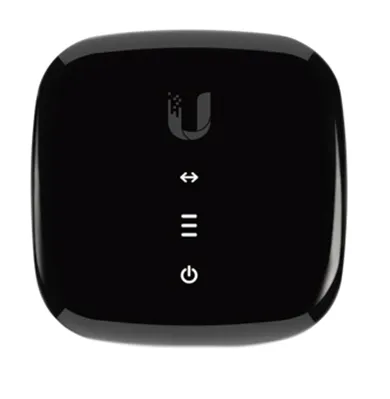
LED | STATUS | MEANING |
| >-< | On | Ethernet connection available |
| - | Steady white | Signal strength indicator |
| - | Steady yellow | No active signal: check the cabling and connectors or call support |
| - | Flashing white/yellow | Configuration problems: contact support |
| Power | On | Power available |
WARNINGS
- To use the ONU, use the power supply provided or a device compatible with the electrical specifications of the unit.
- NEVER restore the ONU to factory settings with a reset. Doing so could mean the device has to be replaced.
PORTS
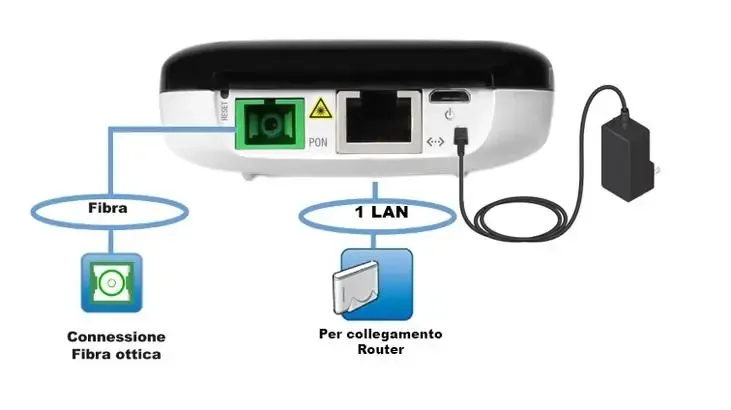
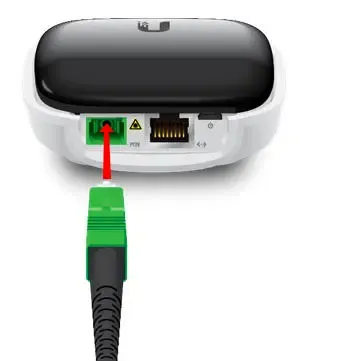
- Fibre: port for the fibre connection via the green connector.
- LAN: Ethernet port for the wired connection to the router.
CONNECTING THE CABLES
- POWER PORT
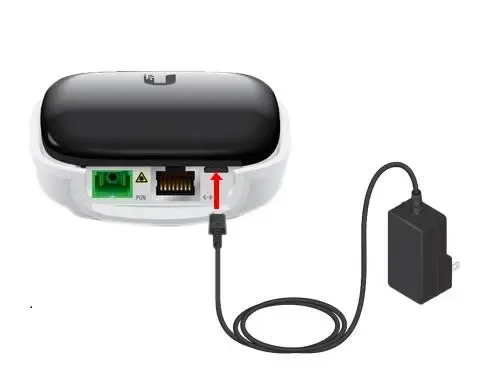
- Take the power supply provided with the UFiber ONU
- Connect the power supply to the power socket of the UFiber ONU
- Plug the power supply into the mains socket.
- WALL OPTICAL PORT: Fibre optic connection
- After removing the protective cap from the green connector, insert one end of the cable into the optical port installed by the technician during installation.
- After removing the protective cap from the other end of the green connector, connect it to the green fibre port (PON) of the ONU
- CONNECTING THE ONU TO THE ROUTER
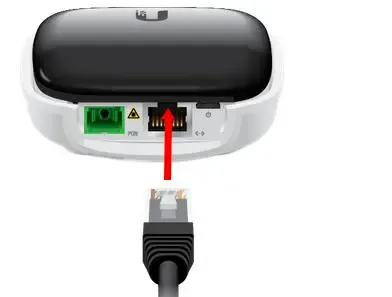
- Connect the white end of the cable provided (white) to the network port (ETH) of the UFiber ONU
- Connect the free end of the cable to the port on your device set up and configured for Internet access (WAN).